Windows Terminal 每日必应壁纸
ps: 由于新版 Windows Terminal 更新了安全规则,不允许使用请求返回图片,只能用静态资源,所以需要脚本捕捉静态资源,本教程下载到本地,若多个设备需要用可以考虑下载到服务器上用统一的 URL
-
将 update-bing-wallpaper.ps1 里的个人相关路径修改
-
设置
wt外观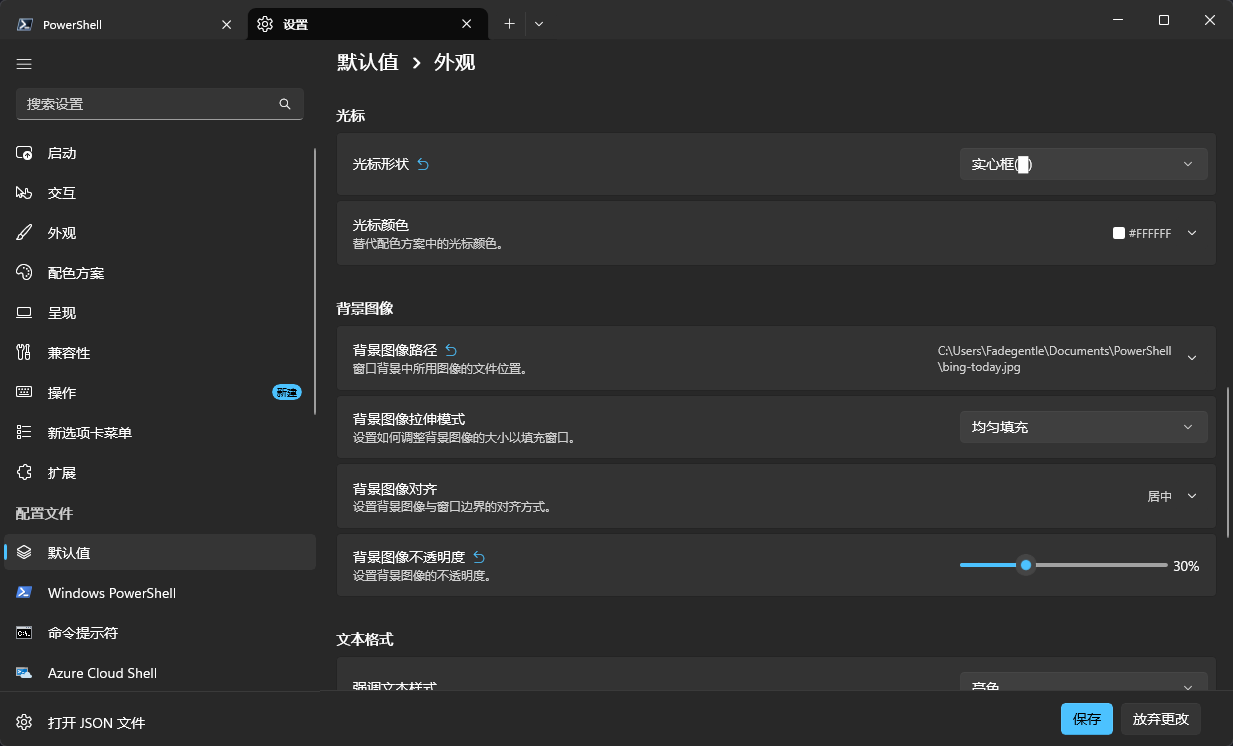
-
推荐手动加入 “任务计划程序”,界面上点点点就行
-
命令行模式加入
-
定时 00
schtasks /Create /TN "UpdateBingWallpaper" /TR "powershell.exe -ExecutionPolicy Bypass -WindowStyle Hidden -File \"C:\Users\Fadegentle\Documents\PowerShell\update-bing-wallpaper.ps1\"" /SC DAILY /ST 00:01 /RU "%USERNAME%" /RL LIMITED /F -
条件 登录时
schtasks /Create /TN "UpdateBingWallpaper_Login" /TR "powershell.exe -ExecutionPolicy Bypass -WindowStyle Hidden -File \"C:\Users\Fadegentle\Documents\PowerShell\update-bing-wallpaper.ps1\"" /SC ONLOGON /RU "%USERNAME%" /F -
查询任务
schtasks /Query /TN "UpdateBingWallpaper" -
手动运行
schtasks /Run /TN "UpdateBingWallpaper" -
删除任务
schtasks /Delete /TN "UpdateBingWallpaper" /F
-